RoomSketcher Reviews 370

TrustScore 4.5 out of 5

4.4

While we don't verify specific claims because reviewers' opinions are their own, we may label reviews as "Verified" when we can confirm a business interaction took place. Read more

To protect platform integrity, every review on our platform—verified or not—is screened by our 24/7 automated software. This technology is designed to identify and remove content that breaches our guidelines, including reviews that are not based on a genuine experience. We recognise we may not catch everything, and you can flag anything you think we may have missed. Read more

Review summary

Created with AI, based on recent reviews

Evaluating 132 reviews, reviewers overwhelmingly had a great experience with this company. Customers consistently find the platform user-friendly and intuitive, praising its clear layout and easy-to-learn interface, even for beginners. Many appreciate the efficiency of the product, noting how quickly they can create professional-looking floor plans and visualize spaces with features like drag-and-drop functionality and 3D views. The customer service is frequently highlighted as excellent, with people commending the quick, professional, and friendly support, including helpful webinars and one-on-one sessions. However, some customers also noted that certain aspects, like adjusting walls or furniture colors, are not immediately obvious, and some desire more customization options and a broader selection of furniture. A few other people also felt that the pricing structure, particularly the credit system and the cost of the Pro version, could be expensive or perceived as primarily profit-driven.

What people talk about most

User experience

Reviewers consistently express satisfaction with the user experience, highlighting the platform's intuitive... See more

Product

Customers consistently note positive experiences with the product, describing it as a very good and intuitive... See more

Customer service

Clients share positive opinions on customer service, consistently describing it as excellent, very good, and... See more

Price

Consumers find price to be ambiguous, with many reviewers considering the service to be reasonably priced and... See more

Application

Customers had positive experiences with the app, with many considering it a favorite due to its ease of use... See more

Reviews shaping this summary

Rated 4 out of 5 stars

RoomSketcher is very user friendly, I like the drag and drop and easy placement options. The rendering quality is superb and my clients enjoy being able to visualize the space with the 360 mode. I wou... See more

Company replied

Rated 4 out of 5 stars

Roomsketcher has a clear and simple layout and was easy to teach myself how to use. Anything I did not understand was easy to find out from youtube tutorials etc. Now I have been using it for seve... See more

Company replied

Rated 4 out of 5 stars

We were searching for a way to show our clients a room plan in 3-D and also an app that would offer a room capture option. Room Sketcher has provided both of those at a reasonable price point for our... See more

Company replied

Rated 4 out of 5 stars

After getting a hang of Room Sketcher, it’s easy to use, but initially things are not obvious like adjusting wall, measurements and colors of furniture, etc. Also, once you purchase Pro, that’s not th... See more

Company replied


Company details

  1. Software Company
  2. Software Vendor

About RoomSketcher

Written by the company

RoomSketcher is professional floor plan software that makes it easy to create and share accurate, high-quality floor plans.
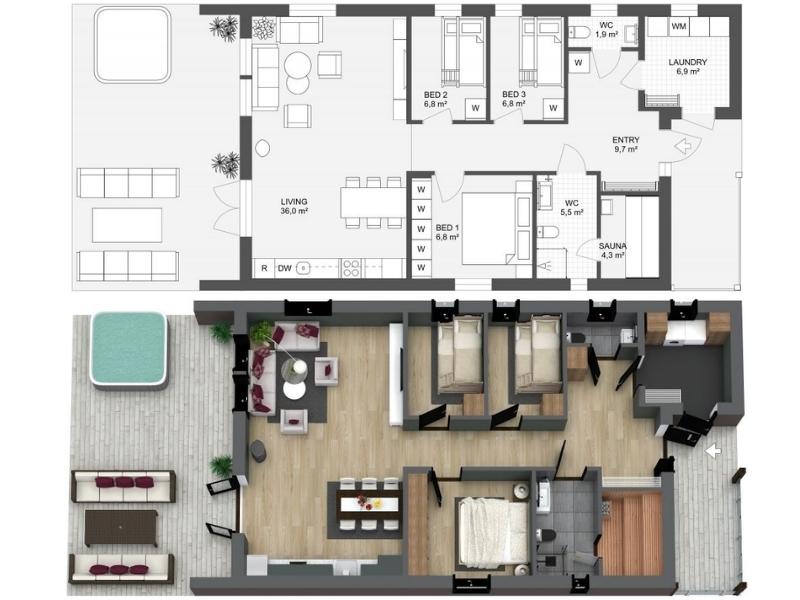
RoomSketcher Example
RoomSketcher gives you the flexibility to create floor plans in five different ways.

Draw your floor plans from scratch, order your existing blueprint to be redrawn, manually trace over existing sketches, use AI Convert to quickly transform existing plans, or scan floors with your phone into RoomSketcher (available on iOS).

With RoomSketcher, you can:
  • Create polished 2D & 3D floor plan visualizations in your style.
  • Work seamlessly across computers and tablets with cloud-synced projects.
  • Save time by letting our team quickly convert existing plans for you.
Trusted by thousands of real estate professionals, interior designers, and general contractors worldwide since 2007. We help you save time, impress clients, and boost your marketing with visuals that stand out.

Visit RoomSketcher’s Website

Contact info

4.4

Excellent

TrustScore 4.5 out of 5

370 reviews

5-star
4-star
3-star
2-star
1-star

Asks customers to review

This company invites their customers to review, whether positive or negative

Replied to 100% of negative reviews

Typically replies within 48 hours

How this company uses Trustpilot

See how their reviews and ratings are sourced, scored, and moderated.

Companies on Trustpilot aren't allowed to offer incentives or pay to hide reviews. Reviews are the opinions of individual users and not of Trustpilot. Read more

Rated 5 out of 5 stars

I USE ROOM SKETCHER TO PLAN MY RENOVATION

I USE ROOM SKETCHER TO PLAN MY RENOVATION PROJECT AND HAVE FOUND IT VERY EASY TO USE THERE IS IS PLEANTY OF TRAINING VIDEOS TO GUIDE YOU THROUGH

27 November 2025
Unprompted review
RoomSketcher logo

Reply from RoomSketcher

Hi Brian, thanks for the review. Glad to hear RoomSketcher has been a good fit for your renovation projects, and that our videos have been helpful. We appreciate it!

Rated 5 out of 5 stars

I recently completed the RoomSketcher…


I recently completed the RoomSketcher training and found it incredibly valuable. I learned how to add my own logo to my floor plans, which will make my drawings look more professional and aligned with my client presentations. Overall, the training was practical, informative, and genuinely useful for streamlining my design workflow. I’d highly recommend it.

27 November 2025
Unprompted review
RoomSketcher logo

Reply from RoomSketcher

Hi Sharon, thank you so much for the review. We're really happy you've found our training on customization useful. Thanks for choosing RoomSketcher!

Rated 4 out of 5 stars

Very easy to use

30 November 2025
Unprompted review
RoomSketcher logo

Reply from RoomSketcher

We're glad to hear it Jorge! Thank you for choosing RoomSketcher.

Rated 4 out of 5 stars

Easy to use and fun

The program is easy to use and fun. I use this program for both business and personal. Lots of support is available if you have any concerns or questions. I do wish it had a function to add more styles of furniture, and specific types of furniture but other then that I am very happy with the program.

27 November 2025
Unprompted review
RoomSketcher logo

Reply from RoomSketcher

Hey Alana, thank you for the review. We're so happy you're finding RoomSketcher fun! If you have specific recommendations for furniture, or furniture styles, we'd be happy to hear about them through our customer support team for future consideration. Thank you.

Rated 5 out of 5 stars

Home design program that’s easy to use and professional

For the most part very intuitive and produces excellent and professional 2D and 3D home designs…I like how they also provide free webinars and teaching videos to answer any questions you have…the costs seem very reasonable as well…if you keep up on usage it becomes an easy program to produce amazing renderings

17 November 2025
Unprompted review
RoomSketcher logo

Reply from RoomSketcher

We really appreciate the review. It's great to hear you find RoomSketcher intuitive, our webinars useful, and our pricing system reasonable. Thank you so much for choosing RoomSketcher!

Rated 5 out of 5 stars

extremely intuitive

I am very new to the software and was a little intimidated at the start. But as soon as I started "playing" with it, used the inside the web tutorials, all became easier, very intuitive. It is a GREAT tool!

25 November 2025
Unprompted review
RoomSketcher logo

Reply from RoomSketcher

Hi Marlena, thanks for the review. We're so glad you've found RoomSketcher intuitive, and our web tutorials useful! Thanks for choosing RoomSketcher.

Rated 4 out of 5 stars

Quick way to generate floor plans

I was looking for a platform that I could learn to use quickly in order to draw floor plans to get building permits for my renovation company. I struggle a great deal with anything related to tech or computers, but I was up and running pretty quickly with this program

17 November 2025
Unprompted review
RoomSketcher logo

Reply from RoomSketcher

Thanks for the review Ryan. We're so glad you can use RoomSketcher for your renovation company. Feel free to reach out to our support team if you run into any issues, we're happy to help!

Rated 5 out of 5 stars

An efficient program to create amazing floor and 3d plans

It is an efficient program and among the different positive aspect I would mention the fact that it is super easy to use...after an hour I was able to create my first floor plan

21 November 2025
Unprompted review
RoomSketcher logo

Reply from RoomSketcher

Hi Fabiana, thank you for the review. We're so glad you could get going with RoomSketcher so quickly. We're glad you like it!

Rated 4 out of 5 stars

The program is easy to use and quite…

The program is easy to use and quite intuitive. I've been using it for at least a dozen years now and I can see how much it has improved. I'm glad they're constantly looking to expand and add furniture and material libraries.

18 November 2025
Unprompted review
RoomSketcher logo

Reply from RoomSketcher

Thank you so much for the review Aleksandra. A dozen years! We're so happy to hear you've been using RoomSketcher for so long. Thank you for continuing to choose RoomSketcher.

Rated 3 out of 5 stars

Ease of customization, but lacks ability to select multiple walls or floors to apply the same changes to all at once

Customization is easy, but not being able to select multiple walls or floors to apply the same finish to multiples makes the finishing product longer to get to. In this business, time is money.

12 November 2025
Unprompted review
RoomSketcher logo

Reply from RoomSketcher

Hi Josh, thanks for the review and feedback, we're glad you're enjoying RoomSketcher's customization options.

For quick material changes, you can enter Materials Mode (by clicking the orange button on the top right and selecting 'Materials' or pressing 3 on your keyboard). Once in this mode, you can select a material and apply it to multiple surfaces at once, making changes much quicker!

I hope that's helpful and feel free to reach out to our customer support if you encounter any issues.

Rated 5 out of 5 stars

Room sketcher allows me to turn around…

Room sketcher allows me to turn around drawings for clients quickly and without effort.

12 November 2025
Unprompted review
RoomSketcher logo

Reply from RoomSketcher

Hi Alan, thank you so much for your review. We're so glad you've found RoomSketcher useful and quick to use!

Rated 5 out of 5 stars

I love RoomSketcher for my business!

RoomSketcher has allowed me to create floor plans that help merchandise my business. It also creates 3d renderings for furniture clients and allows them to see the furniture and decor they are wanting for their space before making a purchase.

10 November 2025
Unprompted review
RoomSketcher logo

Reply from RoomSketcher

Hi Brittaney, thank you so much for the review. We're really glad RoomSketcher has helped you market and grow your business!

Rated 1 out of 5 stars

It is outright fraudulent to call a…

It is outright fraudulent to call a level of this product "pro." There is zero reason to believe that the RoomSketcher team actually invests in any development of its product. For everything it does, there are two that undermine that. Adding dimensions? One click. Deleting dimensions? 20 clicks. Place an exterior wall? Easy. Wanna overlay one level atop another so you can see where your load walls are? CANNOT be done. Add a few walls? Easy? Do not want them all to be the exact same height? CANNOT be done. Use the same tools often? Too bad. There is no persistent panel that shows your recently used tools. Wanna invite somebody else to make edits? RoomSketcher SAYS this is easy. But nobody can make it work. Upgrade to the VERY EXPENSIVE "Teams" version because you're tired of trying to share the way RoomSketcher says you can? Well, that will probably fail, too, because their user management software was written on punchcards, it seems, because it doesn't work well. Need help? Well, their BOT will just spew-out useless stuff that is sorta related. Wanna speak to an ACTUAL PERSON? Expect to wait hours for a response to an email, and then get an unhelpful -- but kind -- response confessing that their product sucks (well, that it doesn't do that much that well).

6 November 2025
Unprompted review
RoomSketcher logo

Reply from RoomSketcher

Hi Marc, thank you for taking the time to share your feedback. We're really sorry about your experience with RoomSketcher so far.

We appreciate your time detailing the issues you've run into. It helps us identify and prioritize improvements.

RoomSketcher is under active development, and our team is currently focused on reworking the back-end code, which, although not as visible to users as front-end changes, is essential for improving the overall experience.

Our customer support team has also followed up with you directly through email, and the sharing issues should be resolved.

To address your comments: Wall heights are indeed fixed per level within the app, and levels are drawn separately. RoomSketcher is primarily a floor plan software, so we don't currently support technical drawings, such as elevations and cross-sections, or level stacking.

Thank you as well for your suggestion about adding a persistent recent tools menu. I've shared all your feedback with the rest of our team for consideration in future updates.

We appreciate your patience and understanding, and we hope to keep improving your experience with RoomSketcher.

Rated 5 out of 5 stars

RoomSketcher is the best!

RoomSketcher allows us to present professional looking floor plans to our clients. No more scribbles on graph paper

31 October 2025
Unprompted review
RoomSketcher logo

Reply from RoomSketcher

We're so glad you're enjoying RoomSketcher Debbie! Thanks for the review.

Rated 5 out of 5 stars

It is really easy to create very good…

It is really easy to create very good floorpans 3d and 2d in minutes. Especially with some training it gets faster, the more you learn and the ease of use is very good, as its already very simple to use RoomSketcher

23 October 2025
Unprompted review
RoomSketcher logo

Reply from RoomSketcher

Hi Fabien, we appreciate the review. I'm really glad that you were able to get started with RoomSketcher so easily. If you run into any issues, feel free to visit our help center or reach out to our customer support team. Thanks!

Rated 5 out of 5 stars

Love this App

Love this App. Easy to use - awesome look

24 October 2025
Unprompted review
RoomSketcher logo

Reply from RoomSketcher

Hi René, thanks for the review! Thanks for choosing RoomSketcher.

Rated 4 out of 5 stars

Reasonably priced, easy to use software

This program is reasonably priced and pretty intuitive. I have used it off and on for 3 years, and am always pleased with the results I am able to achieve. The program offers flexibility with the design features too. It's a great addition to my toolkit!

23 October 2025
Unprompted review
RoomSketcher logo

Reply from RoomSketcher

Thank you so much for your review. We're so happy that RoomSketcher has been your go-to for so long! We really appreciate it.

The Trustpilot Experience

Anyone can write a Trustpilot review. People who write reviews have ownership to edit or delete them at any time, and they’ll be displayed as long as an account is active.

Companies can ask for reviews via automatic invitations. Labeled Verified, they’re about genuine experiences.

Learn more about other kinds of reviews.

We use dedicated people and clever technology to safeguard our platform. Find out how we combat fake reviews.

Learn about Trustpilot’s review process.

Here are 8 tips for writing great reviews.

Verification can help ensure real people are writing the reviews you read on Trustpilot.

Offering incentives for reviews or asking for them selectively can bias the TrustScore, which goes against our guidelines.

Take a closer look